How to CORRECTLY Forward or Redirect Domains in Cloudflare [2024]
By Administrator on May 27, 2025
BeginnerSOURCE: https://www.youtube.com/watch?v=htWOvulFsrQ
Please refer to the following guide for more information on forward A domain name to another domain using
Cloudflare
GOAL: Forward all requests going to www.reCIPHER.AU and reCIPHER.AU to https://www.reCIPHER.com without any errors or alerts
STEPS:
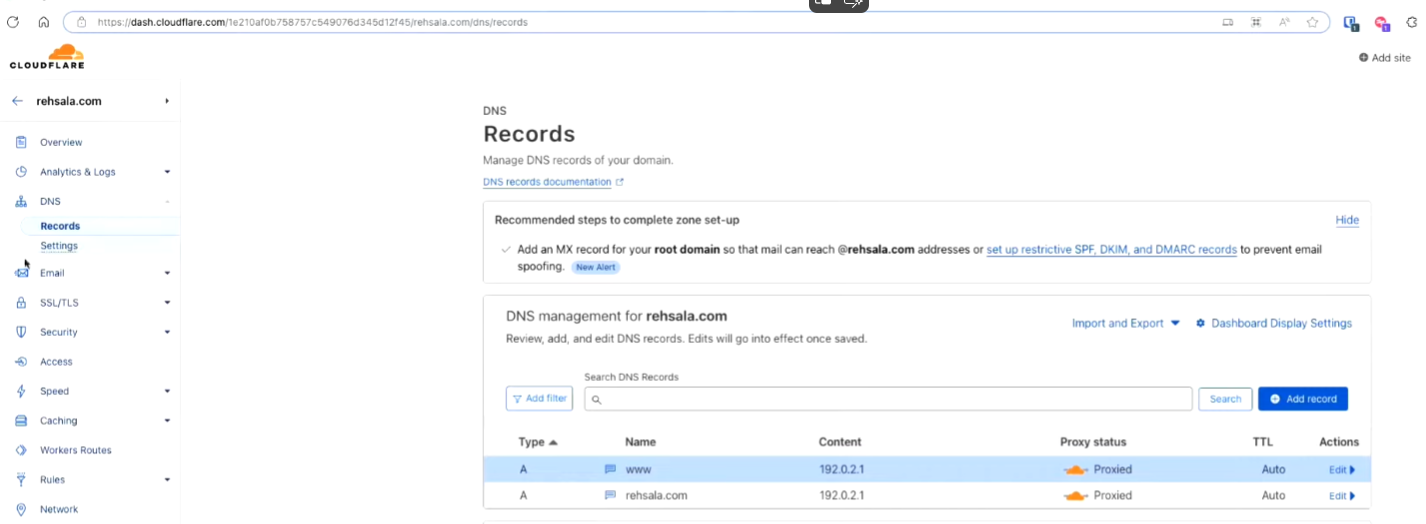
1. In Cloudflare, manage the Recipher.AU DNS records
2. Create a new a record for www.reCIPHER.AU pointing to the Static IP Address 192.0.2.1
3. Create a new a record for @ [root] pointing to the Static IP Address 192.0.2.1
4. Select Rules and create a new Redirect Rule for All Incoming Requests
5. Change the redirect type to static and use the URL https://www.reCIPHER.com [in this example]
6. Test redirect has successfully implemented by browsing to recipher.au [should redirect to https://www.reCIPHER.com]
More articles on DNS